MS II v3(code 2.86)
I just finished finally assembly of MS. When I power it up via Jstim, both injector lights on the stim alternate & D14 flashes with them. Adjusting the CLT pot makes D15 go on & out. After maybe 15 seconds everything goes out & I can see the power light on the stim go dim. All tests prior to this final one checked out ok.
First thing I checked for were solder bridges & didnt see anything. Does this sound like a short or something that I'm missing?
Thanks for the help!
nebraska_e28
Testing MS & all lights go dim / out
Forum rules
Read the manual to see if your question is answered there before posting. Many users will not reply if the answer is already available in the manual.
If your question is about troubleshooting, configuration, or tuning, you MUST include your processor type (MS-I or MS-II) and code version in your post. If your question is about PCB assembly or modifications, you must also include the main board version number (1.01, 2.2 or 3.0).
If you have questions about MS1/Extra or MS2/Extra code configuration or tuning, please post them at www.msextra.com Such questions posted here will be moved to: a temporary MSextra sub-forum, where they will be removed after 7 days
The full forum rules are here: Forum Rules, be sure to read them all regularly.
Read the manual to see if your question is answered there before posting. Many users will not reply if the answer is already available in the manual.
If your question is about troubleshooting, configuration, or tuning, you MUST include your processor type (MS-I or MS-II) and code version in your post. If your question is about PCB assembly or modifications, you must also include the main board version number (1.01, 2.2 or 3.0).
If you have questions about MS1/Extra or MS2/Extra code configuration or tuning, please post them at www.msextra.com Such questions posted here will be moved to: a temporary MSextra sub-forum, where they will be removed after 7 days
The full forum rules are here: Forum Rules, be sure to read them all regularly.
-
nebraska_e28
- MegaSquirt Newbie
- Posts: 20
- Joined: Tue May 18, 2010 1:01 pm
-
Matt Cramer
- Super Squirter
- Posts: 2951
- Joined: Sat Jul 03, 2004 11:35 am
Re: Testing MS & all lights go dim / out
Sounds like a short, all right. To check for a short in the Megasquirt PCB, power up the Megasquirt on a Stimulator or on the car and check the following points for voltage with a multimeter.
You should find the same voltage as the battery voltage on the following points: S12, S12C, the center legs of Q9 and Q12, the left (non-banded) end of D3, the left leg of U5, and the left (banded) end of D9.
You should have 5 volts at the following points: S5, the two +5V holes in the proto area, the right (non-banded) end of D9, the right leg of U5, the left (banded) end of D19, and pins 1, 20, and 31 of the CPU.
Let me know where you find the correct voltages, and where you find the wrong ones.
You should find the same voltage as the battery voltage on the following points: S12, S12C, the center legs of Q9 and Q12, the left (non-banded) end of D3, the left leg of U5, and the left (banded) end of D9.
You should have 5 volts at the following points: S5, the two +5V holes in the proto area, the right (non-banded) end of D9, the right leg of U5, the left (banded) end of D19, and pins 1, 20, and 31 of the CPU.
Let me know where you find the correct voltages, and where you find the wrong ones.

-
nebraska_e28
- MegaSquirt Newbie
- Posts: 20
- Joined: Tue May 18, 2010 1:01 pm
Re: Testing MS & all lights go dim / out
Just to clarify, are S12 & S12C the pins on the db37 and & S5 is the pin on db9?
Also, I didnt install Q9 & Q12 since they didnt seem to be needed. I'll be using fidle to control a separate board for the iacv.
Also, I didnt install Q9 & Q12 since they didnt seem to be needed. I'll be using fidle to control a separate board for the iacv.
-
Matt Cramer
- Super Squirter
- Posts: 2951
- Joined: Sat Jul 03, 2004 11:35 am
Re: Testing MS & all lights go dim / out
These are points on the board. They're not on any D-Subs.nebraska_e28 wrote:Just to clarify, are S12 & S12C the pins on the db37 and & S5 is the pin on db9?
You should still find the volts at the holes where Q12 and Q9 would have been.Also, I didnt install Q9 & Q12 since they didnt seem to be needed. I'll be using fidle to control a separate board for the iacv.
-
nebraska_e28
- MegaSquirt Newbie
- Posts: 20
- Joined: Tue May 18, 2010 1:01 pm
Re: Testing MS & all lights go dim / out
Ok, found them. It was late & must've been tired.  Here are the voltages & additional info. Something must be way off. Keeping in mind that I did pass the test at step 55 & that did work. referenced here: viewtopic.php?f=30&t=38107
Pins jumpered on stim:
left 2 pins of the Primary Tach
WBO2
All stim dip switches are off.
Power supply voltage = 14.7
S12, S12C, = .90
the center legs of Q9 and Q12, = .58
the left (non-banded) end of D3, the left leg of U5, and the left (banded) end of D9. = .01
the left leg of U5, and the left (banded) end of D9 = .01
S5, & the two +5V holes in the proto area, = .01
S5, & the right (non-banded) end of D9, = .01
S5, & the right leg of U5, = .01
S5, & the left (banded) end of D19, = .01
S5, & pins 1, 20, and 31 of the CPU. = = .01
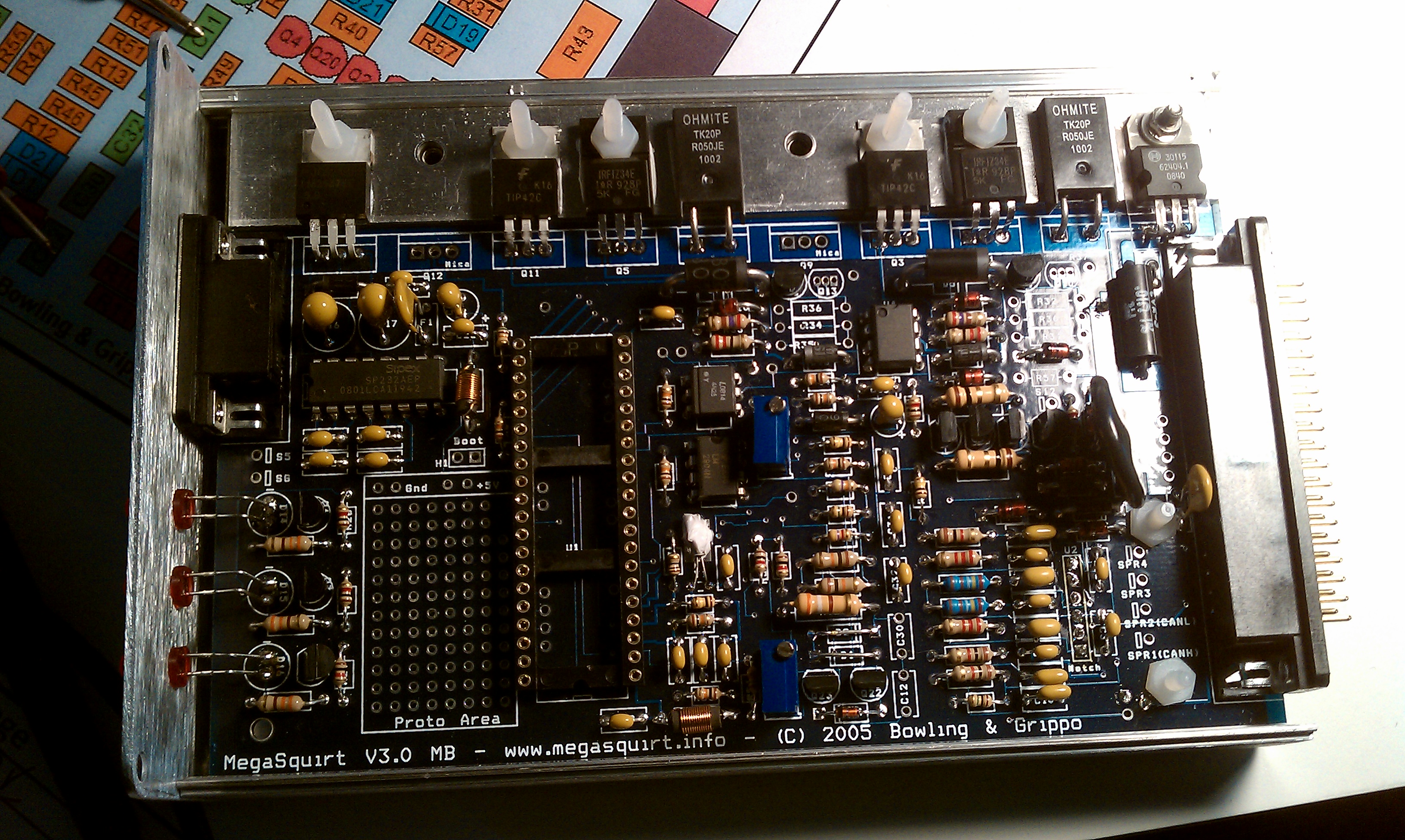
pic of board here:
http://e28-535i.com/upload/MSboard.jpg
Here are the voltages & additional info. Something must be way off. Keeping in mind that I did pass the test at step 55 & that did work. referenced here: viewtopic.php?f=30&t=38107Pins jumpered on stim:
left 2 pins of the Primary Tach
WBO2
All stim dip switches are off.
Power supply voltage = 14.7
S12, S12C, = .90
the center legs of Q9 and Q12, = .58
the left (non-banded) end of D3, the left leg of U5, and the left (banded) end of D9. = .01
the left leg of U5, and the left (banded) end of D9 = .01
S5, & the two +5V holes in the proto area, = .01
S5, & the right (non-banded) end of D9, = .01
S5, & the right leg of U5, = .01
S5, & the left (banded) end of D19, = .01
S5, & pins 1, 20, and 31 of the CPU. = = .01
pic of board here:
http://e28-535i.com/upload/MSboard.jpg
-
nebraska_e28
- MegaSquirt Newbie
- Posts: 20
- Joined: Tue May 18, 2010 1:01 pm
Re: Testing MS & all lights go dim / out
Just did some more testing & adding this if its of any significance.
Across the middle leg & the leg closest the heat sink of Q19 & Q20 I get continuity. The same thing happens across Q15 & Q14 between the middle leg and the leg closest to DB37. Though I used very little heat, could I have shorted these out when soldering?
Across the middle leg & the leg closest the heat sink of Q19 & Q20 I get continuity. The same thing happens across Q15 & Q14 between the middle leg and the leg closest to DB37. Though I used very little heat, could I have shorted these out when soldering?
-
nebraska_e28
- MegaSquirt Newbie
- Posts: 20
- Joined: Tue May 18, 2010 1:01 pm
Re: Testing MS & all lights go dim / out
6/20 0024hrs update
I pulled Q19 & it tested fine with no short condition. While it was removed I tested the solder points that it mounts to & the same condition exists as noted above. I think it's safe to say that there must be a short somewhere on the circuit that includes Q19. Please advise.
Thanks again! While awaiting a response, I'll take a peak at the schematic to see if I get further.
I pulled Q19 & it tested fine with no short condition. While it was removed I tested the solder points that it mounts to & the same condition exists as noted above. I think it's safe to say that there must be a short somewhere on the circuit that includes Q19. Please advise.
Thanks again! While awaiting a response, I'll take a peak at the schematic to see if I get further.
-
Matt Cramer
- Super Squirter
- Posts: 2951
- Joined: Sat Jul 03, 2004 11:35 am
Re: Testing MS & all lights go dim / out
Several of the transistors you mentioned have a 1 ohm, or even a 0.05 ohm, resistor across two of their legs. These probably aren't shorted out. It sounds as if the problem is on the 12 volt plane somewhere after the D10 diode. Is U5 getting hot?
-
nebraska_e28
- MegaSquirt Newbie
- Posts: 20
- Joined: Tue May 18, 2010 1:01 pm
Re: Testing MS & all lights go dim / out
Just checked & U5 doesn't get hot. Left it on for about 30 seconds. I also checked D10 & D9. They both still work oneway.
I did just realize, when I scrubbed the bottom of the board with alcohol it was 70% & not 90% as recommended.
I did just realize, when I scrubbed the bottom of the board with alcohol it was 70% & not 90% as recommended.
-
Matt Cramer
- Super Squirter
- Posts: 2951
- Joined: Sat Jul 03, 2004 11:35 am
Re: Testing MS & all lights go dim / out
Try desoldering the D10 diode and repeat the voltage check - what results do you get?
-
nebraska_e28
- MegaSquirt Newbie
- Posts: 20
- Joined: Tue May 18, 2010 1:01 pm
Re: Testing MS & all lights go dim / out
Removed D10 & all tests done with cpu in board except for the last one.
Between S12, S12C, = jumps to 4.47v & then slowly decreases
the center legs of Q9 and Q12, = 0
the left (non-banded) end of D3, the left leg of U5, = .25 with stim voltage off & when 4.7 when powered up
the left leg of U5, and the left (banded) end of D9 = .34 with stim voltage off & same when powered on
S5, & the two +5V holes in the proto area, = 0
S5, & the right (non-banded) end of D9, = 0
S5, & the right leg of U5, = 0
S5, & the left (banded) end of D19, = 0
S5, & pins 1, 20, and 31 of the CPU. = 0
Between S12, S12C, = jumps to 4.47v & then slowly decreases
the center legs of Q9 and Q12, = 0
the left (non-banded) end of D3, the left leg of U5, = .25 with stim voltage off & when 4.7 when powered up
the left leg of U5, and the left (banded) end of D9 = .34 with stim voltage off & same when powered on
S5, & the two +5V holes in the proto area, = 0
S5, & the right (non-banded) end of D9, = 0
S5, & the right leg of U5, = 0
S5, & the left (banded) end of D19, = 0
S5, & pins 1, 20, and 31 of the CPU. = 0
-
Matt Cramer
- Super Squirter
- Posts: 2951
- Joined: Sat Jul 03, 2004 11:35 am
Re: Testing MS & all lights go dim / out
Check the mica insulators under Q9 and Q12; it sounds like they may be shorted to ground. Also make sure the trace that supplies them power isn't burned (it's on the bottom layer and readily visible).
-
nebraska_e28
- MegaSquirt Newbie
- Posts: 20
- Joined: Tue May 18, 2010 1:01 pm
Re: Testing MS & all lights go dim / out
Removed the metal screws from both Q9/Q12 & lifted both of them slightly so they weren't in contact with the metal cooling strip. Applied power to the board, & am still seeing the light on the stim go dim after maybe 1/2 second. The trace on bottom wasn't burned either. I checked for continuity between the middle leg & DB37, we're good there. Man, I'm starting to feel like the little slow kid in math class.  All your help is appreciated Matt! What's next?
There's gotta be something simple I'm missing.
All your help is appreciated Matt! What's next?There's gotta be something simple I'm missing.
-
nebraska_e28
- MegaSquirt Newbie
- Posts: 20
- Joined: Tue May 18, 2010 1:01 pm
Re: Testing MS & all lights go dim / out
Been searching the board for anything else out there that might point me in the right direction, but haven't found anything.
-
nebraska_e28
- MegaSquirt Newbie
- Posts: 20
- Joined: Tue May 18, 2010 1:01 pm
Re: Testing MS & all lights go dim / out
6/25 update
With a little advice from Peter Florance, I was able to determine that D19 was bad. I hadn't noticed this before, but it was getting extremely hot even though installed correctly. I'll be buzzing DIY an email with this info.
LJ
With a little advice from Peter Florance, I was able to determine that D19 was bad. I hadn't noticed this before, but it was getting extremely hot even though installed correctly. I'll be buzzing DIY an email with this info.
LJ
-
nebraska_e28
- MegaSquirt Newbie
- Posts: 20
- Joined: Tue May 18, 2010 1:01 pm
Re: Testing MS & all lights go dim / out
The problem was C14 installed backwards! A little deductive reasoning, alot of patience, & attention to detail is what it took. I worked backwards though the instructions from the end back to the point where it was testing ok verifying EVERYTHING. Found the + symbol on C14 on the wrong side. Lesson well learned, lesson well taught.
All lights are working well now. I have yet to hook it back up to the computer, but am very optimistic about that.
Thanks for all your help Matt & Jerry!
Hopefully once I'm knowledgeable enough I can give back & help out the new guys troubleshooting their MS builds!
LJ
All lights are working well now. I have yet to hook it back up to the computer, but am very optimistic about that.
Thanks for all your help Matt & Jerry!
Hopefully once I'm knowledgeable enough I can give back & help out the new guys troubleshooting their MS builds!
LJ